
In summary:
- Contrary to popular belief, turning your heat completely off when you leave costs more than using a smart setback temperature due to your home’s thermal inertia.
- Your smart thermostat is a powerful diagnostic tool; use its data on runtime and humidity to pinpoint hidden energy leaks like poor insulation or air gaps.
- Maximum savings come from a systemic approach: combining smart thermostat automation with physical upgrades like better insulation, thermal curtains, and a reliable offline Wi-Fi strategy.
If you’ve invested in a smart thermostat, you were likely sold on the promise of effortless energy savings. Yet, many homeowners see their energy bills spike in winter and summer, leaving them wondering what went wrong. The common advice is to “set a schedule,” but if your bills are still high, it’s clear that a simple schedule isn’t the whole story. You’re using the features, but you’re not leveraging the real intelligence of the device.
The problem is that most people treat their smart thermostat like a fancy timer. They’re missing the bigger picture. True efficiency doesn’t come from just turning the heat down; it comes from understanding your home’s unique energy signature—how it gains, loses, and retains heat. The real power of your thermostat is its ability to act as a diagnostic tool that helps you work *with* your home’s physics, not against it.
Forget the basic “set it and forget it” approach. This guide will show you how to move beyond simple schedules and use your thermostat’s advanced features to make intelligent decisions. We’ll explore why turning your system off is a costly mistake, how to use data to find your home’s weak points, and how to build a resilient smart home ecosystem that saves you money without ever sacrificing comfort. This is how you make your smart investment finally pay off.
For those who prefer a visual guide, the following video offers a practical walkthrough of installing and setting up a typical smart thermostat, which is the first step toward implementing the advanced strategies we discuss.
To help you navigate these advanced techniques, this article is structured to build your expertise from the ground up. You will learn the core principles of smart climate control before moving on to integrating your thermostat with your home’s broader infrastructure for maximum efficiency.
Summary: Mastering Your Home’s Climate for Real Savings
- Why Turning Your Heat Off Completely During the Day Actually Costs More?
- How to Set Up Geofencing so Your House Heats Up Before You Arrive?
- Room Sensors or Single Thermostat: Which Is Necessary for Multi-Story Homes?
- The Humidity Oversight That Makes Your Smart AC Work Twice as Hard
- How to Use Smart Alerts to Change HVAC Filters at the Exact Right Time?
- How to Prioritize Energy Efficiency Renovations for Maximum Bill Reduction?
- How to Build a Stable IoT Ecosystem That Doesn’t Crash When Wi-Fi Drops?
- How to Select Sustainable Home Textiles That Are Durable and Toxin-Free?
Why Turning Your Heat Off Completely During the Day Actually Costs More?
It seems logical: if you’re not home, the heating system should be off. Zero usage equals zero cost, right? This is one of the most common and costly mistakes I see homeowners make. The reason it backfires is a concept called thermal inertia. Your house, with its walls, furniture, and structure, acts like a thermal battery. It takes a significant amount of energy to bring it up to a comfortable temperature from a cold start.
When you turn the system off completely, you allow the entire structure to get cold. Upon your return, the HVAC system has to run at full blast for an extended period, not just to heat the air, but to reheat the walls, floors, and everything in the house. This massive energy spike to recover from a deep cold state often uses more fuel than simply maintaining a lower, stable temperature throughout the day.
The smart approach is to use a “setback” temperature—typically 7-10°F (or 4-6°C) lower than your comfort setting. This keeps the home’s thermal mass from getting completely cold, requiring a much shorter and less intense recovery cycle. According to the U.S. Department of Energy, you can achieve up to 10% in annual savings just by using a proper setback strategy for 8 hours a day. The key is to find the perfect balance for your specific home.
Your Action Plan: Find Your Home’s Break-Even Temperature
- Test Day 1 (Setback): Set your thermostat to an “Away” mode or a manual setback of 7-10°F lower than your usual setting for an 8-hour period while you are out.
- Test Day 2 (Off): On a day with similar outside temperatures, turn your HVAC system completely off for the same 8-hour period.
- Collect Data: Use your thermostat’s app to compare the detailed energy usage reports from both days. Look specifically at the energy spike during the recovery period.
- Analyze Recovery: Note how long it takes for the house to return to your comfort temperature in both scenarios. A longer, high-power recovery often indicates higher costs.
- Confirm Conditions: Ensure your comparison is fair by checking that the outdoor temperatures on both test days were reasonably close.
How to Set Up Geofencing so Your House Heats Up Before You Arrive?
A fixed schedule is a good start, but it’s rigid. It doesn’t account for days you leave work early or get stuck in traffic. This is where geofencing transforms your smart thermostat from a reactive timer into a proactive comfort system. Geofencing uses your smartphone’s GPS location to create a virtual perimeter, or “fence,” around your home.
Setting it up is usually done directly within your thermostat’s app. You define a radius around your home—say, two or three miles. When your phone crosses this boundary on your way out, the app automatically signals your thermostat to switch to your energy-saving “Away” temperature. More importantly, when you cross that same boundary on your way back, it triggers the system to start heating or cooling, ensuring the house is perfectly comfortable the moment you walk through the door. No more arriving to a cold house and waiting for it to warm up.
The real intelligence lies in the learning algorithm. Over time, your thermostat learns how long it takes to bring your home to your desired temperature under different weather conditions. It might start heating 30 minutes before your arrival on a mild day, but 45 minutes on a freezing one. This dynamic adjustment ensures you never waste energy by starting too early or sacrifice comfort by starting too late. It’s the ultimate expression of “set it and forget it,” because it adapts to your life in real-time.
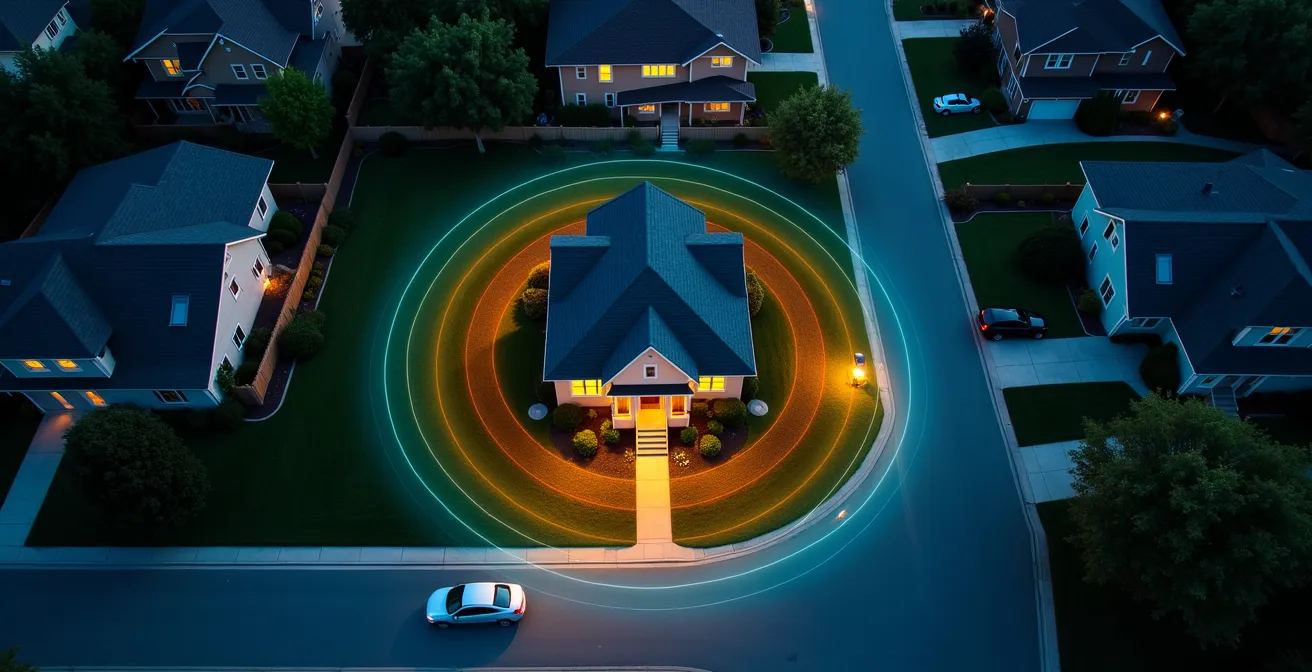
As the visual above suggests, you can think of geofencing as creating invisible zones of comfort around your property. This automated control is a massive step up from manual adjustments, providing both convenience and optimized energy use without you having to think about it. It’s the key to making savings truly effortless.
Room Sensors or Single Thermostat: Which Is Necessary for Multi-Story Homes?
If you live in a multi-story home, you’ve experienced it: the thermostat is on the main floor, which feels fine, but the upstairs bedrooms are freezing in winter or sweltering in summer. This is due to the stack effect, where warm air naturally rises and cool air sinks. A single thermostat located in a central hallway can’t possibly account for these drastic temperature differences, leading to massive inefficiency and discomfort.
A single thermostat only measures the temperature in one spot. To make the upstairs comfortable, you have to “over-cool” or “over-heat” the main floor, wasting huge amounts of energy. This is where smart room sensors become essential, not just a luxury. By placing wireless sensors in key rooms (like the master bedroom, a home office, or a nursery), you give your thermostat the data it needs to make smarter decisions.
With a multi-sensor system, you can tell your thermostat to prioritize different rooms at different times. For example, you can program it to maintain a perfect 70°F in the home office during the day, and then switch its focus to ensuring the bedrooms are at a comfortable sleeping temperature at night. The system averages the temperatures or prioritizes specific sensors, running the HVAC system just enough to keep the *occupied* spaces comfortable. For anyone with a multi-story or sprawling ranch-style home, a multi-sensor setup is the only way to truly solve comfort imbalances and stop paying to heat or cool empty rooms.
This table from a comparative analysis by Consumer Reports clearly breaks down the advantages of a system with multiple sensors.
| Feature | Single Thermostat | Multi-Sensor System |
|---|---|---|
| Temperature Accuracy | One location only | Room-by-room monitoring |
| Stack Effect Compensation | Limited | Excellent with strategic placement |
| Occupancy Detection | Central location only | Multiple room detection |
| Cost | $140-250 | $250-400 with sensors |
| Best For | Single-story homes | Multi-story or zoned homes |
The Humidity Oversight That Makes Your Smart AC Work Twice as Hard
Most homeowners focus exclusively on one number: the temperature. But in the summer, there’s another critical factor that dramatically impacts both your comfort and your energy bill: humidity. High humidity makes the air feel much warmer and stickier than it actually is. Your body cools itself by evaporating sweat, but when the air is already saturated with moisture, that process slows down dramatically.
As a result, you might set your AC to a chilly 70°F, but it still feels stuffy and uncomfortable. Your air conditioner is working overtime, not just to cool the air, but also to pull massive amounts of moisture out of it—a process called dehumidification. This is incredibly energy-intensive. A smart thermostat that also monitors humidity can provide a much more efficient solution.
Many modern smart thermostats have a built-in hygrometer to measure relative humidity. By targeting an ideal indoor humidity level (typically between 40% and 50%), you can feel perfectly comfortable at a higher temperature. For instance, 75°F with 45% humidity can feel more comfortable than 72°F with 65% humidity. Some thermostats can control a whole-home dehumidifier or even use your AC in a special “dehumidify” mode. This focuses on removing moisture first, which often allows the AC to run for shorter cycles, saving significant energy while delivering a higher level of perceived comfort.

Ignoring humidity is like trying to cool your home with one hand tied behind your back. By monitoring and controlling it, you can set your thermostat several degrees higher and feel even more comfortable, leading to substantial savings on your summer electricity bills. It’s the single biggest overlooked factor in cooling efficiency.
How to Use Smart Alerts to Change HVAC Filters at the Exact Right Time?
The old advice for HVAC maintenance was to change your air filter every 90 days. This calendar-based approach is simple, but completely inefficient. A filter’s lifespan depends not on time, but on HVAC runtime. In mild months your system might barely run, while during a heatwave it could be running constantly. Changing a filter that’s still clean is a waste of money, while leaving a clogged filter in place is even worse.
A clogged filter is like trying to breathe through a straw. It forces your HVAC system’s fan motor to work much harder to pull air through, drastically increasing energy consumption and putting unnecessary strain on the equipment. This can lead to premature system failure, an expensive repair I see all too often.
This is where your smart thermostat’s data becomes a powerful maintenance tool. Most smart thermostats track and report on your system’s daily and monthly runtime. Instead of relying on a generic 90-day rule, you can set up a reminder based on accumulated hours of operation. Many HVAC professionals recommend changing a standard 1-inch filter after approximately 500 to 600 hours of runtime. Your thermostat app does the math for you.
Example: Using Runtime Data for Predictive Maintenance
Your thermostat’s energy insights app is more than just a historical record; it’s a diagnostic tool. By reviewing humidity, ambient temperature, and runtime, you can spot anomalies. If you notice your air conditioning runtime is steadily increasing in a specific room or for the whole house compared to last year under similar temperatures, it’s a strong indicator that something is impeding airflow. The first and cheapest thing to check is a dirty filter. This runtime-based approach to filter replacement ensures your system always operates at peak efficiency, saving energy and extending its lifespan.
How to Prioritize Energy Efficiency Renovations for Maximum Bill Reduction?
A smart thermostat is the brain of your HVAC system, but it can only do so much if it’s controlling an inefficient “body”—your house. For the average American household, nearly half the annual energy bill, often more than $900 per year, goes to heating and cooling. If you’re planning home renovations, your smart thermostat’s data is the best tool you have for prioritizing projects that will deliver the biggest reduction in that cost.
Stop guessing where your energy is going. Use data to find the real culprits. If you have room sensors, you can conduct a simple DIY energy audit. Let the sensors log temperatures in various rooms overnight. The room that loses heat the fastest is your #1 priority for insulation and air sealing. Is it the room with old, drafty windows? Or the one with an uninsulated attic above it? The data will tell you exactly where your money is leaking out.
You can even quantify the impact of smaller projects. Before and after you install new weather stripping on a door, for example, compare the HVAC runtime data from your thermostat app. A noticeable drop in runtime for that zone is a clear indicator of your return on investment. By using your thermostat as a diagnostic tool, you can move from a vague desire to “be more efficient” to a data-driven plan. You’ll tackle the biggest energy vampires first—like attic insulation or window sealing—ensuring every dollar you spend on renovations delivers the maximum possible reduction on your future energy bills.
How to Build a Stable IoT Ecosystem That Doesn’t Crash When Wi-Fi Drops?
A major concern for any homeowner investing in smart technology is reliability. What happens to your “smart” thermostat if the Wi-Fi goes down? Will you be left in the freezing cold? This is a valid fear, and as a technician, I advise choosing hardware that is designed for resilience. The good news is that reputable smart thermostat manufacturers have already solved this problem.
You are not dependent on a constant internet connection for basic operation. Virtually all major smart thermostats have local schedule storage. This means the schedule you’ve programmed—including your setback temperatures and comfort settings—is stored directly on the device itself. If your Wi-Fi router reboots or your internet service provider has an outage, the thermostat will continue to run its stored schedule flawlessly. You won’t notice a thing.
Where you will see a difference is in the “smart” features that rely on the cloud, such as remote control via your phone, geofencing, or receiving voice commands from a smart assistant. Those will be temporarily unavailable. However, different brands handle this offline state with varying degrees of sophistication. Some, like Ecobee, retain their full complex schedule indefinitely, while others may revert to a more basic program. This is a critical factor to consider when purchasing a device.
This data from a comprehensive guide to smart thermostats shows how different brands behave when they lose their internet connection.
| Brand | Offline Behavior | Local Schedule Storage | Failsafe Mode |
|---|---|---|---|
| Nest | Maintains last schedule | Yes, 10-day schedule | Auto-away after timeout |
| Ecobee | Full schedule retained | Yes, indefinite | Comfort settings maintained |
| Honeywell | Basic schedule only | Limited | Reverts to manual mode |
| Amazon | Maintains schedule | Yes, 7-day | Temperature hold at last setting |
Key Takeaways
- Stop turning your heat completely off. Use a smart setback of 7-10°F to work with your home’s thermal inertia, not against it, to prevent costly recovery cycles.
- Treat your thermostat as a diagnostic tool. Use its data on runtime, humidity, and room-specific temperature drops to identify your home’s biggest energy leaks.
- Maximum savings come from a systemic approach. Combine smart automation with physical improvements like thermal curtains and targeted insulation for the highest return on investment.
How to Select Sustainable Home Textiles That Are Durable and Toxin-Free?
After optimizing your thermostat and sealing your home, the final layer of efficiency comes from an often-overlooked area: your home textiles. The fabrics you choose for your curtains, bedding, and rugs have a direct impact on your home’s thermal performance and can help you feel more comfortable at more energy-efficient thermostat settings.
The most important textile choice for energy savings is installing thermal curtains, especially on large or older windows. These curtains have an insulated backing that can reduce heat loss through windows by up to 25% in the winter and block significant solar heat gain in the summer. This simple, relatively low-cost addition creates a buffer that directly reduces the load on your HVAC system.
Your bedding choices also play a role in personal comfort, allowing you to lower the thermostat at night. In summer, switch to breathable fabrics like linen or lightweight cotton (with a low TOG rating of 4.5 or less) that wick away moisture. In winter, flannel sheets and high-TOG duvets (10.0-13.5) trap body heat effectively, allowing you to comfortably lower the nighttime temperature by a few extra degrees. Furthermore, placing thick area rugs on hardwood or tile floors adds another layer of insulation, reducing heat loss through the floor. By using textiles to manage your “micro-climate,” you can adjust your home’s “macro-climate” for significant savings.
Start today by auditing just one of these areas—whether it’s finding your home’s setback temperature or checking your humidity levels. Taking control of your home’s unique energy signature is the smartest investment you can make for both your wallet and your comfort.